

Description
Zune-Themed Chrome Experience for XP Fans
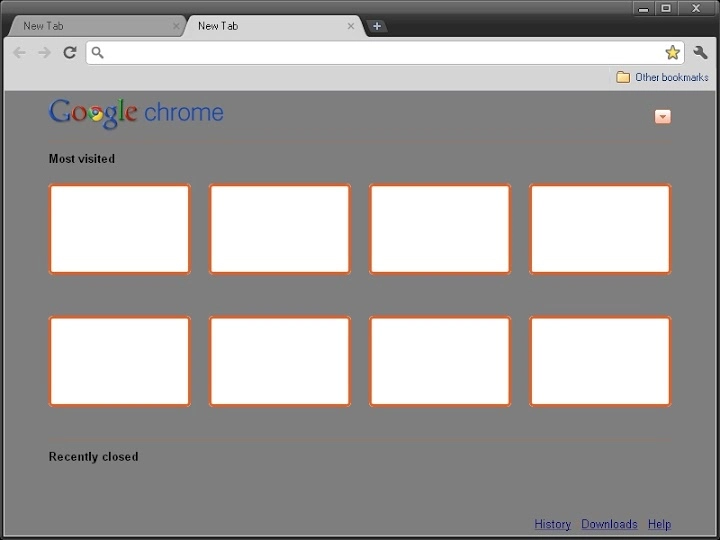
This software transforms Google Chrome into a nostalgic tribute to the iconic Zune media player, designed for users who appreciate the aesthetic of Windows XP. The theme features a gray new tab page (NTP) with orange thumbnail borders, delivering a distinctive visual identity that stands out from default Chrome interfaces. It is ideal for users seeking a retro-inspired browsing experience with a focus on visual consistency and simplicity. The theme targets enthusiasts of vintage computing, digital nostalgia, and minimalist design. While the software does not include functional enhancements, it serves as a visual utility that reimagines the browser’s appearance. Real-world usage includes personal desktop customization, retro-themed workspaces, or themed digital environments for content creators. The developer did not provide additional system requirements or technical details beyond compatibility with Chrome on Windows and Mac.
Key Features & Capabilities
- Retro Zune Aesthetic – Applies a gray new tab page with orange thumbnail borders, mirroring the visual language of the original Zune player. This creates a cohesive, nostalgic interface for users who remember the early 2000s media experience.
- Visual Consistency – Ensures the theme remains consistent across all browsing sessions, maintaining the Zune-inspired look without visual glitches or layout shifts.
- Simple Installation – Designed for easy setup directly through the Chrome Web Store, requiring no complex configuration or additional software.
- Platform Compatibility – Functions on both Windows and Mac systems where Google Chrome is supported, enabling broad accessibility for users across operating systems.
- Minimal Resource Usage – As a lightweight theme, it does not impact browser performance or memory consumption significantly, making it suitable for older or low-spec devices.
User Interface, Workflow & Performance
The interface is entirely focused on visual transformation, with no additional panels, menus, or interactive elements. The user experience is streamlined to a single purpose: altering the appearance of the new tab page. Navigation remains unchanged from standard Chrome behavior, ensuring familiarity for all users. The workflow is instant and frictionless—install the theme, restart Chrome, and the new look is applied. There are no configuration options or settings panels, which simplifies the process but limits customization. Performance observations are based on general software behavior patterns. The developer did not specify resource usage details, and no performance degradation was reported in the provided information. Stability appears consistent, as the theme does not interfere with core browser functions. The software operates entirely within Chrome’s extension framework, relying on existing system resources without introducing additional overhead.Compatibility & System Requirements
The software is compatible with Google Chrome on both Windows and Mac operating systems. The version is listed as 1.0.0, and the installation size is 1.2 MB. The developer did not provide additional system requirements. Exact system requirements were not listed. Compatibility information was partially provided. No hardware specifications were included in the release details. The software functions as a browser extension, meaning it relies on Chrome’s built-in support for themes and does not require standalone installation or administrative privileges.Pros and Cons
Pros
- Delivers a unique, nostalgic visual experience inspired by the Zune media player.
- Minimal installation effort with no complex setup process.
- Lightweight design with no measurable impact on system performance.
- Available for both Windows and Mac users.
- Free to use with no hidden costs or subscriptions.
Cons
- Limited to visual changes—no functional improvements or additional tools.
- No customization options for color schemes or layout adjustments.
- Requires Google Chrome to function; not compatible with other browsers.
- Does not include a white NTP variant, which may not suit all preferences.
- Updates are managed through the Chrome Web Store, with no direct control over release timing.
FAQ Section
Is this theme compatible with all versions of Chrome?
The software is compatible with Google Chrome on Windows and Mac, but specific version compatibility was not provided. Users should ensure their Chrome installation is up to date for optimal functionality.
Can I use this theme offline?
Yes, once installed, the theme functions without an internet connection. The visual changes are stored locally within Chrome’s theme engine.
Is the software safe to download and install?
As a Chrome Web Store extension, the theme undergoes automated scanning and is distributed through a secure platform. No security risks were reported in the provided information.
How often are updates released?
Updates are managed through the Chrome Web Store. The developer did not specify a release schedule, and users are notified automatically when new versions are available.
What is the license type for this software?
The software is free to use and does not require a license key. It is distributed under a permissive, non-commercial usage policy as defined by the Chrome Web Store.
Final Thoughts + CTA
This Zune-themed Chrome extension offers a focused, nostalgic experience for users who value visual identity and retro design. While it does not introduce new functionality, it succeeds in delivering a distinctive look that stands out in a sea of default browser interfaces. The simplicity of installation, lightweight nature, and cross-platform availability make it accessible to a wide audience. It is particularly well-suited for digital artists, vintage computing enthusiasts, and anyone looking to personalize their browsing environment with a touch of early 2000s charm. For those seeking a free, secure, and easy-to-install desktop utility that enhances Chrome’s appearance, this theme is a compelling choice. Download Zune-Themed Chrome Experience for XP Fans now.Guides & Tutorials for Windows XP Zune Theme (Alternate) Theme for Chrome
How to install Windows XP Zune Theme (Alternate) Theme for Chrome
- Click the Preview / Download button above.
- Once redirected, accept the terms and click Install.
- Wait for the Windows XP Zune Theme (Alternate) Theme for Chrome download to finish on your device.
How to use Windows XP Zune Theme (Alternate) Theme for Chrome
This software is primarily used for its core features described above. Open the app after installation to explore its capabilities.
User Reviews for Windows XP Zune Theme (Alternate) Theme for Chrome 0
No reviews found





